18 Email Marketing Best Practices to Boost Your Open Rate
Editor’s Note: How to Use This Guide
Quick answer: Use this page to make a clearer decision about content and audience development. Start with the reader or customer problem, check whether the advice still matches current platform behavior, and only then choose tools, tactics, or budget. The safest improvements are usually better measurement, clearer page structure, stronger examples, and more useful internal links.
Practical Decision Checklist
| Question | Why it matters |
|---|---|
| What is the reader or campaign goal? | Prevents advice from becoming generic or tool-led. |
| What has changed since the article was first published? | Keeps platform, SEO, and tool recommendations realistic. |
| Can the result be measured? | Avoids decisions based only on traffic, impressions, or vanity metrics. |
| What should be avoided? | Protects budget, reader trust, and Google-policy compliance. |
| Which SEMUpdates page should readers visit next? | Improves navigation without forcing keyword-heavy anchors. |
Best practices for email marketing that everyone should follow:
1. Don’t purchase contact lists
Email best practices start with a rule – a contact database should be compiled dutiful to customers’ data privacy. You can’t add a person to a mailing list without obtaining consent to do so. Moreover, GDPR sets specific rules for applying for such permission, including opt-in verification procedures. So, contact lists of dubious origin aren’t what reputable companies can use for handling email marketing strategies. Purchasable databases are fraught with more perils other than violating courtesy or guidelines. They can contain non-existing or invalid email addresses. So, every time you’ll launch a new campaign, you’ll receive a batch of delivery errors or spam complaints. To avoid the threat of being blacklisted by ISPs, use email search tools from proven software providers. Also, put a subscription form on your website and use lead magnets – to encourage users to share their contacts.2. Avoid using ‘No-Reply’ in the sender’s email address
Some use ‘no-reply’ email addresses to send out transactional messages, e.g. confirmation messages. These indicate the email was compiled automatically and doesn’t require any retaliation from a recipient. By sending from ‘no-reply’ email addresses, companies aim to save time on sorting and reviewing incoming mailings. Still, they may ultimately face a decrease in delivery ratio due to anti-spam systems. Or – fail to grasp an important dialogue or feedback, which, in turn, will weaken brand reputation and customer satisfaction. So, unless you manage tens of thousands of correspondence daily, don’t use ‘no-reply@’ emails.3. Optimize the email preview text
This is the first your recipient sees, so be mindful of what you write there. Because people may flip through inboxes via smartphones, it is better to write a preview around 40-50 characters long (equal to 20-25 words). This way, the text will not appear cut off on small screens. You allow you to form the preview line from the email body or write a customized text. The second option is preferable because you will avoid unfortunate cropping and encouragement for opening.4. Include an email signature
This is not a utilitarian component of an email – it is a cherry on the cake. A signature shows how detail-oriented and conscious about the overall brand profile you are. A nice-looking email signature is a chance to emphasize the trustworthiness and style of the company. Typically, an email signature includes the sender’s full name, job position, and contact information. It sometimes can include a photo and links to socials, e.g. LinkedIn or Twitter profiles. You can create a signature by yourself or try generators, like ones from HubSpot or Canva.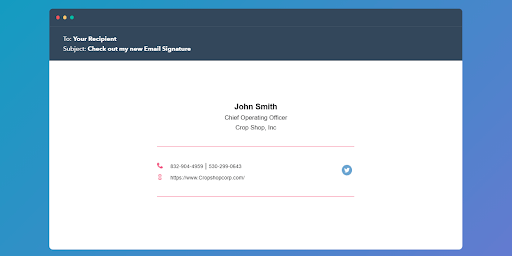 “Use email signature generators and experiment with the design, instead of making it up from scratch”, image source: a snapshot from email signature generator service by HubSpot
5. Clean your mailing list regularly
Data becomes obsolete over time, and the contact list is not an exception. Email addresses move around owners or become abandoned. Subscribers stop opening and reading emails from you or ask for exclusion from the mailing list. You should consider these changes and regularly review an email list. Otherwise, it stops being workable.6. Keep the main message and call-to-action above the fold
Office workers receive around 121 emails every single day, so nobody is willing to spend time wondering what the email is about. That is why after greetings and short good wishes, get to the point immediately. Clearly outline the reason for writing in one or two sentences. For follow-ups, provide a short reference to the previous dialogue, agreement, or actions. Include one clear CTA and highlight it with colors, fonts, spaces, shapes, or all at once. Don’t use general phrases, like “Looking forward to hearing from you” or “Click here” (in case you add a button). Instead, state further actions, e.g. “Can you join a call on Monday, 3 p.m.?” or “Download free template now”.7. Keep your email 500-650 pixels wide
Smartphones have varying display resolutions – from 1125 x 2436 (iPhone X) to 640 x 1136 (iPhone SE). If your copy is too wide, the recipient will have to scroll horizontally to see the full text. So, to create a one-size-fits-all outline, it’s recommendable to design emails no wider than 650 pixels which are around 7 inches.8. A/B test different subject lines and calls to action
Email campaigns return $42 for every $1 spent, but that is only the case when they target the right audience and are well-optimized. Before scaling up patterns, whether they relate to email design or copy, you have to test how they work out on a sample. In other words, you need to A\B test an email. There are several essentials in the matter. First, test one alternative at a time. For example, if you probe a CTA, do this separately from A\B testing subject lines. Otherwise, it will be difficult to evaluate the effect. Also, ensure that both samples are significant and that recipients don’t know you conduct a test.9. Put your logo in the upper lefthand side of the email
The majority of people read from left to right, so if you make the brand logo left-aligned, it’ll be the first thing your recipients see. This isn’t just a matter of design but a practical tip, as well. You can put extra information about your business, e.g. a quote or working hours, next to the logo and, hence, save more space.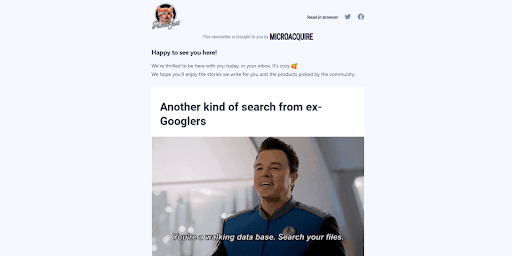 “Put the logo and links to socials on top – to increase their visibility”, image source: a snapshot from Product Hunt newsletter
10. Use incentives to increase open rates
The sure way to make recipients read emails is to share valuable information. Say, your mailing list consists of owners of small businesses. To nurture them, you can prepare a downloadable template for a marketing plan or a solicited proposal, put these on a website, and gate the content. Afterward, you can create one-time access and add a special link to newsletters, so that recipients will be more willing to open and read them.11. Allow recipients to subscribe to your newsletter
If the website has considerable traffic, you can take this advantage to grow your email list. Put subscription forms on as many landing pages as you can afford and tailor them to the surrounding content. You can also combine the form with special offers and encourage more users to subscribe.12. Write compelling (but concise) subject lines
When you write a subject line, avoid spam-trigger words. Urgent or assertive language can catch the eye, but it can also displease mailing systems. And so your message will end up in “Spam”. Prepare genuine yet compelling subject lines. It’s better to put important words first and be specific about the topic of the email. Because you are limited with space, don’t use unnecessary words, like “please” or “following up on”. Instead, focus on actions and numbers, for example, “3 strategies to increase sales” or “Automate your jobs with…”. And don’t forget about personalization. Subject lines with the reader’s first name get 26% more clicks, on average.13. Use auto-responders for opt-ins
If you conduct a double opt-in, you should send a verification email every time someone signs up to the mailing list. It’s wise to use email automation for this job. Otherwise, you will need a team of email marketers – to manage all follow-ups. In the case of a single opt-in, it is nice to greet new subscribers with welcome emails and share information about the brand. Again, it’s better to automate welcome email sequences rather than handling these manually.14. Closely tie emails to landing pages
This will help you get more conversions ultimately. Say, you launch a Sale on the occasion of the upcoming Halloween and want to bring more people to your online store. For that, create a festive landing page showing what benefits buyers can get from shopping. Then, create a respective email campaign. Attach a bright greeting card, share an exclusive discount code or voucher, and add a link to the themed landing page.15. Conduct a five-second test
The test aims to see what people take away from the email after a quick impression. Let your colleagues or mates view an example for 5 seconds. After, ask them to recall what the key message was. This quick exercise will show what catches people’s attention most and give you an idea of further improvements.16. Personalize your email campaigns
Aside from names or job titles, use the following attributes to personalize emails even more:- design (e.g. colours and images)
- demographics
- shopping history.
17. Automate your messages
By using email software you can go far beyond scheduling and automate lead nurturing during the entire customer journey. Start with segmenting the mailing list and defining triggers (leads actions). These may be: website visit, ads click, registration on a website, dropped online shopping cart, etc. Then, build email sequences and upload respective content to the system. For every campaign, check out detailed analytics and adjust further mailings accordingly.18. Make your emails time-sensitive
To encourage recipients to act, you can delicately mention a “deadline” in the email. This may be “good until [the date]” or “ends on [th day]”. Sometimes, hard deadlines can seem too pushy and spammy. If you want to avoid these, use time-sensitive yet more general wordings, like “limited-time offer.”Key takeaways:
- use a verified contact list
- clean up the email database regularly
- segment recipients
- personalize as much, as you can
- share valuable content
- avoid spammy techniques
- A\B test email copies
- give preference to trigger-based email campaigns.
Reader Questions
What is the main takeaway from 18 Email Marketing Best Practices to Boost Your Open Rate?
The main takeaway is to treat content and audience development as a decision process, not a checklist copied from another site. First understand the audience, then check current data, choose the smallest useful improvement, and measure whether it changes behavior. This keeps the advice practical and avoids overpromising results.
What should readers check before applying the advice?
Readers should check the date of the guidance, the platform or tool being discussed, their own audience, tracking setup, and whether the recommendation fits their budget. A tactic that works for one site can fail on another if intent, offer, or measurement is different.
How can this page be used with other SEMUpdates resources?
Use this page as the starting point, then follow the internal links to the Content Marketing hub and related SEMUpdates guides. The goal is to connect strategy, tools, examples, and measurement instead of treating one article as a complete plan.
What should be avoided?
Avoid fake urgency, unsupported statistics, copied recommendations, keyword stuffing, paid-link manipulation, and claims that a single tactic will guarantee rankings, traffic, leads, or revenue. Good marketing advice should explain trade-offs and limitations, not just benefits.






That was an amazing blog! Worth reading!
I would also like to know your thoughts on various email marketing tools like MailEngine, MailChimp, AWeber, etc.